

Here is a quick breakdown for those of you who are not familiar with the Boolean search. We will learn about x-ray search techniques and operators in more detail in this article.
What is Google X-Ray Search?
Google X-Ray is an advanced form of online search. It is very much similar to Boolean search. Google X-Ray helps users curate the most relevant information. Unlike normal online searches, it can also process symbols, keywords, and, of course, phrases into Google Search.
And the entire process shouldn’t be difficult.
For example, let’s imagine that you are a recruiter who wants to find LinkedIn profiles of project managers. In this case, a Google X-ray search could be:
site:linkedin.com/in project-manager

Google X-Ray is widely used for finding qualified candidates online. Even though you are searching on Google, you can narrow it down to a specific website. For example, you can use the command “site,” and limit your search to only certain sites such as LinkedIn or other job sites.
But always remember, using Boolean Search, you cannot access files and information that is protected with a passcode. For example, you cannot access the personal information of Facebook users.
Boolean Search Operators
Unlike a regular search string, Boolean logic helps to define a solid relationship between all the phrases used in the search string. The Boolean Search operators are And, Or, and Not.
- AND is used to tell the search engines what keywords to look for. For example, make a “keyword 1 AND keyword 2” search. In a more concrete example, if you want to work with a developer that also has Java and PHP in the profile, then you should use AND as an operator.
- OR is used when you want the search results to contain any of the terms mentioned. For instance, Google should look for “keyword 1 OR keyword 2”. In case you are interested in finding an engineer that has Java or PHP in their profile, make use of the OR operator. This allows keyword variations.
- NOT (-) is used to tell search engines that keywords or phrases, as well as domains, must be excluded. In case you want to work with an engineer who doesn’t want to manage a team but is more focused on coding, then exclude the “Manager”, “Intern”, or “Team lead” words. Put NOT between the keywords.
How to X-Ray a Search Engine?
The Boolean string should be long and well-defined for the search engine results lists to be more refined.
-
Set Up a Basic Boolean String
What’s great about Boolean searches is that they can search for almost any kind of site. For instance, in case you are interested in programming candidates or a person who has experience with ruby on rails, you no longer must rely on resume databases or sourcing technology. You can even do searches for sites such as Quora, Meetup, or Github, and the profiles of prospective candidates will emerge.
-
Place the Keywords or the Location
You can also add the keywords or the location. These make it possible for the search to be more specific. Your search should be broad, whereas the search strings must be narrowed down. It’s important to set as many parameters as possible because this brings back the most specific search results. In case you want to find candidates in a specific location, search for that location specifically.
-
Narrow Down the Results
As far as search strings go, these can be as complex as you want them to be. For example, a standard Google search allows 32 keywords maximum. And this number of keywords is only for a search string. You should also understand that the matter with search engines is rather complex. For instance, Google uses the “semantic search“. This is a search that recognizes not only what contextual meaning your search terms have but also your intent. In other words, it doesn’t only match the results according to the keywords you have used, but also according to the synonyms of those keywords. For instance, a search for “developer” could also be a search for “programmer” and “development”.
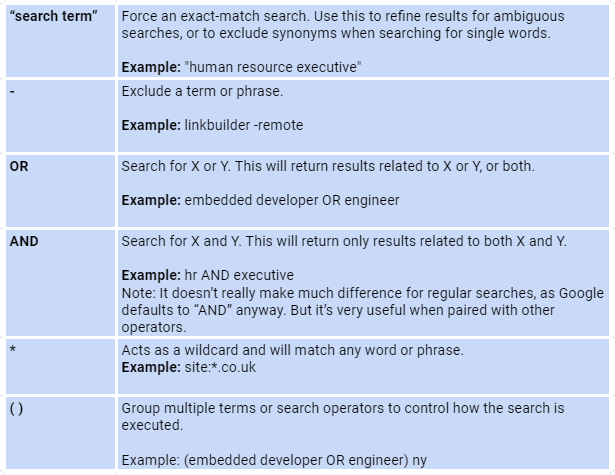
In this case, the command using quotation marks will help you. This command tells the search engine that you only want exact results.
You can see more commands in the following table:

How SignalHire Can Help
Sometimes, it is more convenient to use recruiting databases of contacts rather than use Google X-Ray. SignalHire, for example, features 650+ million professional contacts in one database, supporting the Boolean bulk search. To access profiles faster, consider using the Chrome extension or Firefox version to extract key data right from search results.
This is what the filter looks like, which you can use as an X-ray search:

Here you can immediately specify the required location and position using AND, OR and NOT. There is also a place below to enter keywords in the same way. It can be any word related to the position you are looking for.
For example, you are looking for a Vice President who deals with marketing. In this case, the result of your search may look like this, where “Marketing” was found in the skills.

Before that, you will have a list of all found profiles with such a request. You can add them to your recruiting pipeline and later sort them by the metrics you need. In general, the use of such tools makes the recruiter’s job much easier, because in one place it is possible to perform an X-Ray LinkedIn search and extract contacts immediately.
Search Engines That Can Be Used to Find Talent
You should keep in mind that Google and other search engines haven’t been designed to find people. X-ray search in recruitment is useful for finding talent only when the right search principles and operators are being used. If you want to no longer work as much toward building X-ray searches or toward writing them, decide to use a search engine designed for talents. These are specially developed for finding candidates or their contact information across any platform. For example, you could stop at SignalHire. On this platform, you can find plenty of professionals and search the entire recruiting database by keywords and industries if necessary. And while this platform supports X-ray searches, it has a handier, more user-friendly interface that makes all candidates search way easier.


